How to sign in
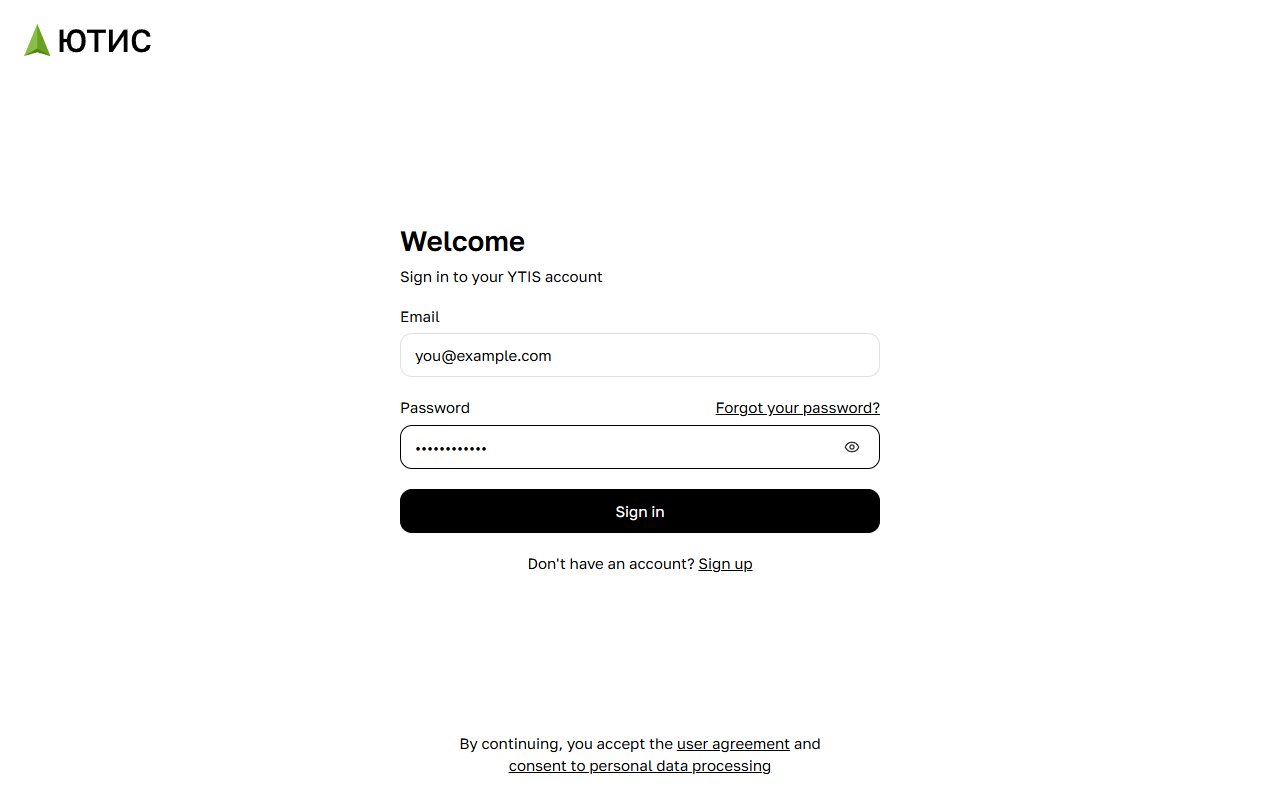
- On the ytis.ru home page, click Sign in in the top right corner.
- Enter your email address in the Email field and your password in the Password field.
- Click Sign in.
Your workspace opens once you're signed in. If you followed a link to a plan or project and YTIS asked you to sign in first, you'll land right on that page.
While you're signed in, the home page shows a Workspace button instead of Sign in — it takes you straight to your workspace.
Can't sign in?
- Incorrect email or password — check the address and your keyboard layout. To see the password you've typed, click the eye icon on the right of the field.
- Forgot your password? Click Forgot your password? above the password field and set a new one with a code from your email. See "Resetting your password" for details.
- Too many requests — wait a few minutes and try again.
- No account yet? Click Sign up below the sign-in button.
How to sign out
- In your workspace, click your name in the top left corner.
- Choose Sign out from the menu.
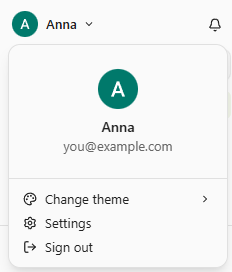
After signing out, you're taken to the YTIS home page. You can also sign out from the home page: click your avatar in the top right corner, then the sign-out icon next to your name.